

VIP Player Support for US iGaming Operators: 2026 Guide
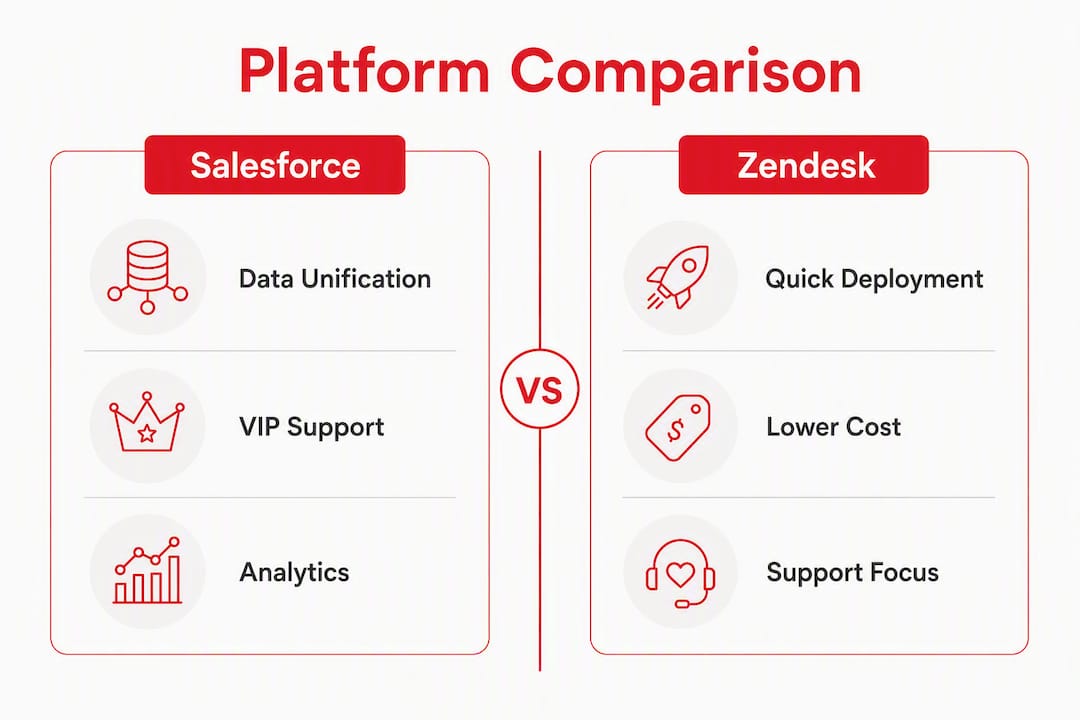
August 2, 2026For most US-licensed online casinos and sportsbooks, Zendesk deploys in days and costs materially less to run, making it the right starting point for operators who need live player support fast. Salesforce Service Cloud wins when your operation requires a unified player record across service, marketing, and VIP retention data, and you have the budget and internal resources to build it properly.
Three operator profiles, three recommendations:
- Small to mid-market, support-first operators: Zendesk. Lower TCO, faster deployment, native omnichannel out of the box.
- Enterprise operators with VIP programs, regulated US markets, and cross-functional data needs: Salesforce Service Cloud. Higher upfront cost, but player lifetime value and deposit history live on one record.
- Operators who need 24/7 multilingual coverage now, without a 6-month platform project: Outsource to Workanova. Skip the implementation risk entirely.
The core trade-off is time-to-value versus long-term data unification. Zendesk gets agents productive in a week. Salesforce Service Cloud gives you a 360-degree player view, but only after weeks or months of configuration, a certified implementation partner, and ongoing admin headcount.
Table of Contents
- How does Salesforce Service Cloud vs Zendesk compare for iGaming?
- How do these platforms affect real player support operations?
- How do you choose the right platform or decide to outsource?
- Key Takeaways
- What we see working with US iGaming operators
- Workanova: managed player support without the platform project
- Further reading and sources
How does Salesforce Service Cloud vs Zendesk compare for iGaming?
| Axis | Zendesk | Salesforce Service Cloud |
|---|---|---|
| Best for | Support-first operators, fast launch | Enterprise ops, VIP retention, CRM unification |
| Time to deploy | Days to weeks | Weeks to months |
| Customization | Moderate; config-driven | Deep; requires admin/SI partner |
| Integrations | Good marketplace; REST APIs | AppExchange ecosystem; broader and deeper |
| Multichannel & multilingual | Native voice, chat, email on most plans | Full omnichannel; multilingual via config |
| Compliance & security | SOC2; PCI add-on for telephony | SOC2, ISO, PCI; data residency configurable |
| Managed-service / BPO readiness | Easy to hand off; low admin overhead | Requires governance layer for BPO handoff |
| TCO (licensing + impl + ops) | Lower | $300–$600/user/month for full stack before discounts |
| Migration complexity | Low to moderate | High; governance-critical |
| Reporting & analytics | Explore; solid for support KPIs | Einstein Analytics; cross-functional depth |
Migration trap: Moving from Zendesk to Salesforce without a defined data model and governance plan creates overly complex systems that are harder to maintain than the original setup. Treat migration as a structural project, not a software swap. Assign a dedicated admin, document every custom object before go-live, and freeze scope for the first 90 days post-launch.
Typical timeline: Zendesk: 3–14 days to first live agent. Salesforce Service Cloud: 6–16 weeks with a certified SI partner; complex iGaming builds (payments, KYC, VIP workflows) often run longer.
Zendesk iGaming pros/cons:
- Pro: Agents productive within days; native voice on most plans; lower implementation spend.
- Pro: Easier BPO handoff with minimal admin overhead.
- Con: Support data stays siloed from marketing and CRM unless you build custom sync pipelines.
- Con: Reporting depth is limited for cross-functional analytics.
Salesforce Service Cloud iGaming pros/cons:
- Pro: Player record unifies service, deposit history, VIP tags, and marketing data natively.
- Pro: AppExchange offers pre-built connectors for payments, KYC, and fraud tools.
- Con: Implementation cost and timeline are significant; budget $50k–$150k+ for a proper iGaming build.
- Con: Governance failures post-launch are the single biggest risk.
Migration recommendation: If you are on Zendesk and considering Salesforce, run a 90-day governance sprint before touching production data. Map your player data model, define role-based access, and confirm PCI attestation for any telephony component before migrating a single ticket.
How do these platforms affect real player support operations?
The platform choice shows up immediately in three workflows: VIP handling, KYC/payments escalations, and fraud chargebacks.
With Salesforce Service Cloud, a VIP player’s case opens directly on their full customer record, including deposit history, bonus activity, and prior escalations. Agents handling retention calls or dispute resolution see the complete picture without switching tools. For operators running tiered VIP programs, that data unification reduces third-party sync costs and simplifies retention workflows in ways Zendesk cannot match natively.

Zendesk’s advantage is concurrency. Native omnichannel support including voice means agents handle live chat, email, and phone from a single queue. During jackpot drops or major sporting events, that routing efficiency matters. Zendesk also hands off cleanly to a BPO or managed provider because the admin overhead is low and the configuration is readable by any trained agent.
Integration effort by workflow:
- Payments webhook (deposit/withdrawal alerts): Zendesk via REST API, 1–3 days; Salesforce via AppExchange connector or custom Flow, 1–3 weeks.
- KYC vendor (document verification + case creation): Zendesk trigger + webhook, 2–5 days; Salesforce Flow + custom object, 2–4 weeks.
- Game provider session tie-in (session ID on ticket): Zendesk custom field + API, 1–2 days; Salesforce custom object relationship, 1–2 weeks.
Post-deployment, both platforms require ongoing governance. For US-licensed operators, that means audit trails for every player data access, role-based permissions aligned to state-level compliance requirements, and PCI-scoped data residency for payment records. Salesforce gives you finer control but demands a dedicated admin to maintain it. Zendesk is easier to govern but offers less granularity.
Pro Tip: After a Salesforce migration, freeze all custom object creation for the first 90 days. Every new customization request goes into a backlog and gets reviewed monthly. This single rule prevents the “customization overload” that causes most iGaming Salesforce deployments to become unmaintainable within a year.
How do you choose the right platform or decide to outsource?
Work through this before you write an RFP.
Pre-evaluation checklist:
- Do you need player lifetime value and deposit history on the support record today, or can you sync it later?
- What is your current ticket volume, and do you expect 3x spikes during peak events?
- Do you have a certified Salesforce admin on staff, or budget to hire one?
- Which KYC and payments providers do you use, and do they have pre-built connectors for your target platform?
- Do you need voice/IVR natively, or is chat and email sufficient for your player base?
- How many languages do you need to support at launch, and in 12 months?
- What is your data residency requirement under your US state license?
Questions to request in writing from vendors:
- AI unit pricing: per-resolution, per-conversation, or flex credits? AI add-ons are consumption-based on both platforms and can significantly change your annual spend at scale.
- Implementation milestones and go-live criteria.
- SLA for data residency configuration and PCI attestation for telephony.
- Sample runbooks for peak events (jackpot drops, major game launches, playoff weekends).
Red flags in vendor quotes:
- Opaque AI pricing with no per-unit breakdown.
- No clear migration governance plan or data model documentation.
- Missing PCI attestation for voice/telephony components.
- Implementation timelines quoted in weeks for a Salesforce build that includes KYC, payments, and VIP workflows.
- No named admin or SI partner on the project plan.
Budget estimates:
- Zendesk: days to weeks to deploy; implementation typically under $20k for a standard iGaming setup.
- Salesforce Service Cloud: 6–16 weeks; full stack (Enterprise + Digital Engagement + Voice) commonly runs $300–$600 per user per month before discounts, plus $50k–$150k or more in implementation fees and ongoing admin resources.
When to outsource instead:
- Ticket volume is growing faster than your hiring pipeline.
- You need 24/7 coverage in 5+ languages within 60 days.
- Your VIP program requires dedicated agents, not shared queues.
- Platform implementation would delay live support by more than 8 weeks.
- Regulatory complexity (multi-state licensing, KYC escalations) requires specialized agent training you cannot build in-house quickly.
Pro Tip: When evaluating a managed provider, ask for a sample SLA document and a QA scorecard before signing. A provider that cannot produce both within 48 hours of your request is not operationally ready for a regulated iGaming environment.
Key Takeaways
For US-licensed iGaming operators, Zendesk wins on speed and cost while Salesforce Service Cloud wins on data unification, and Workanova removes the platform decision entirely for operators who need live, compliant support fast.
| Point | Details |
|---|---|
| Zendesk for speed | Deploys in days to weeks with lower TCO; best for support-first and mid-market operators. |
| Salesforce for unification | Connects service, VIP, and deposit data on one record; justified for enterprise operators with retention programs. |
| Migration governance is critical | Moving to Salesforce without a data model and governance plan creates more complexity, not less. |
| AI costs are variable | Both platforms charge AI features as consumption-based add-ons; model them as ongoing budget items, not fixed license fees. |
| Workanova as the alternative | Operators who need 24/7 multilingual support live in weeks, without a platform project, can outsource to Workanova. |
What we see working with US iGaming operators
The platform debate misses the real question most operators face: not which software is better, but whether they have the internal capacity to operate either one at the level a regulated US market demands.
Salesforce Service Cloud is genuinely powerful for VIP retention and cross-functional analytics. But the operators who get the most from it are the ones who treated the implementation as a 6-month organizational project, not a software rollout. The ones who struggled bought the license, handed it to an SI partner, and went live with a system nobody on the support team could maintain or audit.
Zendesk deployments go live faster, but the support-as-a-silo problem is real. When a player disputes a withdrawal and the agent cannot see the deposit history, the KYC status, or the prior escalation without opening three other tools, resolution time climbs and VIP churn follows.
The pattern that works: start with Zendesk if you need agents live within weeks, build your player data integrations incrementally, and revisit Salesforce when your VIP program and retention workflows justify the investment. If neither timeline fits your current regulatory or growth pressure, a managed provider with pre-built iGaming workflows gets you to compliant, SLA-backed operations faster than either platform alone.
Workanova: managed player support without the platform project
If the checklist above surfaced more gaps than answers, you are not alone. Most US-licensed operators choosing between Salesforce Service Cloud and Zendesk are really choosing between two implementation projects, two admin headcounts, and two sets of compliance risks.
Workanova is the alternative. Since 2014, Workanova has delivered 24/7 multilingual player support in 14+ languages for licensed online casinos and sportsbooks, covering live chat, email, VIP handling, KYC and payments escalations, and QA governance, all under strict SLAs. Operators get a dedicated, trained iGaming support team live in weeks, not months, without hiring, without a platform implementation project, and without the governance risk that comes with either stack. You can scale player support without 50 new hires and stay compliant through jackpot drops, playoff weekends, and multi-state license expansions.
Talk to Workanova about your support requirements and get a deployment timeline specific to your operation.
Further reading and sources
- Salesforce Service Cloud vs Zendesk: Complete 2026 comparison — covers deployment speed, TCO, and CRM unification trade-offs.
- Zendesk to Salesforce Migration: Pros & Cons Explained — migration governance risks and the structural complexity trap.
- Zendesk vs. Salesforce Service Cloud: Real Cost & Fit — real-world stack pricing, AI add-on billing models, and implementation timelines.
- Salesforce Service Cloud vs Zendesk — AppExchange ecosystem depth and analytics capability comparison.
- G2: Compare Salesforce Service Cloud vs Zendesk Support Suite — aggregated user reviews and feature ratings across both platforms.

